
Creating a convincing copy of an existing e-shop is easier today than it was a few years ago. An attacker can automatically download publicly available web content and use AI coding tools to generate the frontend based on the existing site - including its layout, components, and responsive behavior. What used to require hours of manual coding can now be significantly accelerated.

Logo, product photos, texts, design, navigation, and the entire shopping process can initially appear as the original. Sometimes, the customer only notices the difference in the domain.
Such a copy doesn't necessarily serve only to misuse the brand. A fake e-shop can lead the customer to checkout and attempt to obtain personal, login, or payment information from them. Acquiring sensitive data through a site posing as a trusted service or company is one of the principles of phishing.
What to do if you discover such a copy of your website? According to Radoslav Kuchár, Head of Development at ui42, it is important to proceed systematically and address multiple areas simultaneously in such an incident.
First, verify if your website has actually been compromised
The existence of a phishing copy does not automatically mean that the attacker has accessed your e-shop.
That is an important distinction.
Your original website may be completely fine. The attacker may have just copied publicly available content and launched it on their own domain and infrastructure.
Therefore, first verify whether it is just impersonation - imitation of your website – or an actual compromise of your systems.
The developer should especially check access to administration and hosting, unknown user accounts, recent changes and deployments, DNS records, API keys, and other credentials or suspicious activity in the logs.
If you find signs of unauthorized access, you are also dealing with a security incident within your own infrastructure.
If the original e-shop is clean, the next goal is to take its fraudulent copy offline and minimize the number of customers who access it.
1. Gather evidence, then report
Upon discovering a phishing website, you will naturally want it to disappear as quickly as possible.
However, before the first abuse report, document it thoroughly.
The website may be removed, changed, or moved to another infrastructure after being reported. You will need evidence when communicating with the hosting, domain registrar, payment company, and police.
Save screenshots of the fake website, specific URLs, product pages, checkout, and displayed payment options. Also, record the domain, available WHOIS/RDAP and DNS data, IP addresses, and the time you obtained each piece of information.
Do not only screenshot the homepage. Document specific places where the misuse of your identity is visible - logo, products, photos, contact information, or checkout. This way, the provider can more easily compare the phishing website with the original.
Radoslav Kuchár, Head of Development.
2. Find out where the phishing website is hosted
The next step is to identify the infrastructure on which the fake website is running.
For an initial check, you can use tools like HostingChecker, DNS lookup, or IP/ASN lookup tools. The goal is to find out which provider has the technical capability to remove the harmful content.
Be cautious of services like Cloudflare. The domain may use a reverse proxy or CDN, and the IP address you find in DNS may not belong to the actual origin server. Therefore, the lookup itself may not mean that you have found the hosting.
3. Send an Abuse Report to the hosting provider
From our experience, this is one of the most important steps in the entire process. Hosting companies have their own abuse forms or email addresses for reporting phishing, malware, and other abuses of their infrastructure.
Abuse forms are available, for example, at Contabo, Hetzner, or Cloudflare.
In the report, do not just send information that someone "copied your website". The provider needs to know exactly what is happening and where it can be verified. Therefore, provide the fraudulent domain and specific URLs, the address of the original e-shop, an explanation of the misuse of your brand, and information on whether the site collects personal or payment data. Attach evidence as well. The easier the incident is to verify, the greater the chance of a quick response.
From our experience, this step can lead to the shutdown of the phishing site within approximately 24 hours. However, this is not a guaranteed timeframe - the response time depends on the specific provider and case.
Sample Abuse Report for a phishing website
We recommend sending the report in English, especially if it is a foreign provider:
Subject: Phishing / fraudulent website impersonating our e-commerce store
Hello,
I would like to report a phishing website hosted on or associated with your infrastructure.
Fraudulent website: [URL]
Legitimate website: [URL]
The reported website is impersonating our legitimate e-commerce store. It copies our branding, design, product content, and other elements in a way that may mislead customers into believing they are using our official website.
The website appears to be used for fraudulent/phishing purposes and may collect customers' personal and/or payment information.
Examples of fraudulent URLs:
[URL 1]
[URL 2]
[URL 3]
Evidence attached:
– screenshots of the fraudulent website
– screenshots of our legitimate website for comparison
– screenshots of the checkout/payment process
– additional technical information, if available
We kindly ask you to investigate this website and take appropriate action to stop the abuse.
Please let us know if you require any additional information or evidence.
Kind regards,
[Name]
[Company]
[Official domain]
[Contact email]
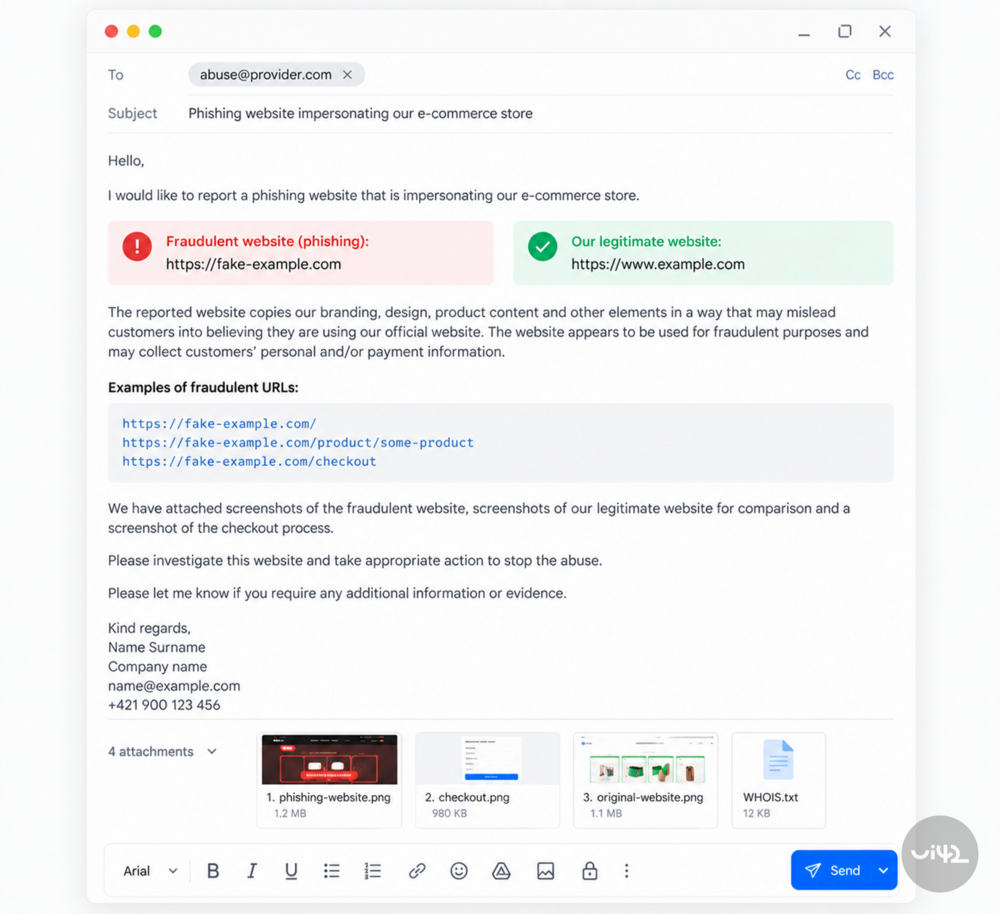
You can use this template as a basis. However, always adapt it to the specific case and the provider's requirements.
4. Find out the registrar of the fraudulent domain
Hosting and domain are not the same.
Hosting provides the infrastructure on which the content runs. Registrar manages the registration of a specific domain. Above it is the registry operator, which manages a specific domain extension – TLD.
For example, .sk, .com, or .live have different registry operators.
Therefore, we recommend addressing hosting and domain in parallel.
Using WHOIS/RDAP, find out the registrar of the fraudulent domain and search for their abuse contact or form. Send them the same evidence you prepared for hosting.
For .sk domains, the registry operator is SK-NIC. SK-NIC recommends reporting the matter to law enforcement authorities if there is suspicion that the domain is being used for illegal or fraudulent activities and states that it can act based on a decision from the relevant authority.
For other TLDs, the procedure may differ, so always check the rules of the specific registry operator.
5. Report phishing to Google and Microsoft
While the hosting or registrar is handling your report, you can reduce the likelihood that a customer will access the fraudulent site without warning.
Therefore, report the phishing URL to:
Google Safe Browsing: google.com/safebrowsing/report_phish/
Microsoft Security Intelligence / SmartScreen: microsoft.com/en-us/wdsi/support/report-unsafe-site-guest
This step will not remove the site from the internet. Its goal is to get the phishing URL into security systems that can warn users about the dangerous site.
6. Find out where payments are directed
If the fraudulent e-shop has a functional checkout, try to identify the payment infrastructure provider.
Sometimes the provider is visible directly. Other times, the user only sees the option to pay by card, Apple Pay, or Google Pay, and it is not clear who processes the payment in the background. In that case, the developer can open Developer Tools → Network and monitor the requests the site sends during checkout. From domains and API endpoints, it is often possible to determine which service the site is communicating with.
If you identify the payment provider, send them a fraud or abuse report with evidence.
Important: Do not perform a real test payment on the fraudulent website and do not enter your actual login or payment information.
7. Report the incident to the police
If the phishing website misuses your company's identity, collects customer data, or receives money from them, report the incident to the police.
This is where you return to the first step.
Screenshots, URL addresses, domain data, hosting information, payment infrastructure, and your communication with providers create a much more usable basis than simply claiming that a copy of your e-shop exists on the internet.
For .sk domains, this step is also relevant considering the procedure of SK-NIC.
8. Inform your customers before the phishing website disappears
Do not wait for the results of abuse reports to communicate.
If the fraudulent website is actively spreading, publish a warning on the official website and social media.
Clearly name the fake domain and state the only official domain of your e-shop.
Also, explain to customers what to do if they have already entered their information on the phishing site.
If they entered a password, they should change it immediately. If they use the same password for other services, it needs to be changed there as well. If they entered payment information or made a payment, they should contact their bank or card issuer without delay.
Can copying an e-shop be prevented?
Not completely. And this is important to understand.
Content that the server must send to the customer's browser is to some extent also accessible to automated tools. Images, texts, HTML, or product information cannot simply be "locked" so that the customer can see them, but a sophisticated scraper cannot.
AI and modern developer tools also reduce the amount of time and technical knowledge needed to create a visually convincing imitation.
Prevention should therefore not be based solely on trying to prevent copying, but primarily on the ability to quickly detect and respond to a copy.
Monitoring domains similar to your brand name, tracking new certificates for similar domains, monitoring unusual bot traffic and aggressive scraping, protecting administration with MFA, secure management of API keys and credentials, or monitoring DNS changes can help.
And most importantly: the company should know who and what will be done when a phishing copy appears.
So what to do when someone copies your e-shop?
Time is crucial with a phishing website. Therefore, do not rely on just one abuse report.
Proceed in parallel:
- Document the phishing website.
2. Verify if your system has also been compromised.
3. Identify the hosting and send an Abuse Report.
4. Identify the domain registrar and report the abuse.
5. Report the URL to Google and Microsoft.
6. Identify and contact the payment provider.
7. Report the case to the police.
8. Inform customers.
Each step addresses a different part of the problem. Hosting can shut down the content. The registrar addresses domain abuse. Google's and Microsoft's security systems can warn users about the phishing site. The payment provider can take action against the payment infrastructure.
And communication with customers reduces the risk that the trust you have built for your brand over the years will be used against you by someone else.