What is a heatmap?
What does it mean
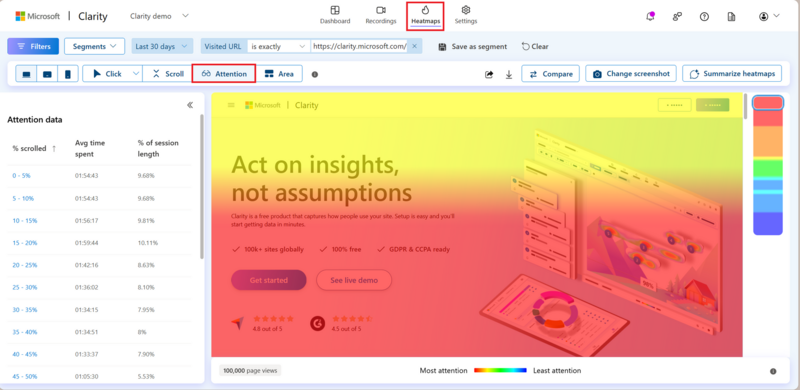
Heatmap is a visual tool that shows how users behave on a website or in an online store. Using color representation, it reveals where people click, where they look, how far they scroll, and which parts of the page interest them the most.
For marketers, UX designers, and online store owners, a heatmap represents one of the fastest ways to understand visitor behavior and uncover obstacles in the purchasing process.
Instead of assumptions, you work with real data about how users actually use the web.
More info
What is a heatmap and what does it tell us about user behavior?
Imagine if you could see where every visitor to your website is looking. While a heatmap doesn't literally track a user's gaze, it very accurately shows which elements attract their attention.
Red and orange areas indicate regions with the highest activity, while blue or gray parts often go unnoticed.
A heatmap can reveal, for example:
- an invisible CTA button,
- important content placed too low,
- elements that people click on even though they are not clickable,
- places where users lose attention.
That's why heatmaps are among the basic tools of UX research and CRO (Conversion Rate Optimization).
Types of Maps: Click, Scroll, and Move Heatmaps
Not every heatmap tracks the same thing. The three most commonly used types are:
Click Heatmaps
They show which elements users click on most frequently.
They help reveal:
- the success of CTA buttons,
- interest in specific content,
- incorrect user expectations.
For example, if visitors repeatedly click on a product image that is not clickable, it may signal a need to adjust the UX.
Scroll Heatmaps
They show how far users get on a page.
They often reveal that a large portion of visitors never see content placed at the bottom of the page.
That's why they help decide:
- where to place CTAs,
- where to shorten content,
- or which sections to move higher.
Move Heatmaps
They track mouse cursor movement.
Although it's not precise eye tracking, research shows that the cursor often mimics user attention. Move heatmaps thus help understand which elements people notice the most.
How to Read Heatmap Data and Identify Problematic Areas
The biggest mistake when working with heatmaps is to only follow the colored spots without context.
It's not just about where people click, but why they click there.
When analyzing a heatmap, it's worth looking for:
- CTA buttons with low interaction rates,
- sections that users skip,
- places with high click concentration without results,
- differences between desktop and mobile,
- unexpected behavior patterns.
A heatmap alone doesn't tell you what needs to change. However, it shows where the problem is likely located.
That's why it's often combined with:
- web analytics,
- user session recordings,
- A/B testing,
- UX research.
Best Tools for Creating Heatmaps (Hotjar, Microsoft Clarity)
Today, there are several tools that allow you to track user behavior using heatmaps.
Hotjar
One of the most well-known tools for UX research. In addition to heatmaps, it offers session recordings, user feedback, and surveys.
It is mainly used for optimizing websites and e-shops.
Microsoft Clarity
A free tool from Microsoft that offers heatmaps and session recording.
Thanks to its simple implementation, it has become very popular, especially among small and medium-sized businesses.
Other Tools
Other solutions include:
- Crazy Egg,
- FullStory,
- Smartlook,
- Contentsquare.
The choice of tool mainly depends on the scope of the project, the volume of traffic, and the level of analysis you need.
We are a ONE-STOP SHOP for growing your business. We connect web and e-shop development, UX and CX design, brand building, marketing, AI solutions and AI agents into one functional whole. Because only then can digital consistently deliver performance and growth.
Latest news

ChatGPT Ads are here, are you ready?

Who is a design engineer and what do they do? A discipline at the intersection of design and code


When to start preparing Christmas campaigns?


Strategic Digitization of a B2B Company 3/3: Digitization Roadmap for the CEO

Finax Case Study: Digital Transformation of an Investment Platform Built on User Research



Strategic Digitization of a B2B Company 1/3: Why AI is Not the First Step

Google Ads update August 17, 2026: why your performance may drop and how to prepare


Shopify is not the problem. The problem is the perceptions that circulate about it.

The number of steps in the cart does not determine the conversion of the e-shop. This does.
Contact us
Everything for the growth of your business in one place
At ui42, we combine strategy, creativity, technology, marketing, and AI into one entity.
We build brands and visual identities, create websites and e-shops, design UX and CRO, create creative content, and deliver measurable results through performance marketing.
Our solutions are enhanced by FLUIDUM – ui42's AI intelligence, which transforms company data into a competitive advantage.
Thanks to this, you gain a partner who can cover the entire digital ecosystem of your business – from the first contact with the brand to conversion.

Don't miss out on the latest news from the world of UX, programming, analytics, and marketing.

Thank you for subscribing!

Get a free consultation
What do you need help with?
Select all options that apply to you
The form has been sent successfully.